In a world dominated by smartphones and an ever-increasing demand for on-the-go entertainment, Internet Protocol Television (IPTV) has emerged as a game-changer. Kenya, with its tech-savvy population, is no stranger to this trend. IPTV services are available on your mobile phone in Kenya, ensuring you never miss a moment of your favourite shows, sports, or movies.
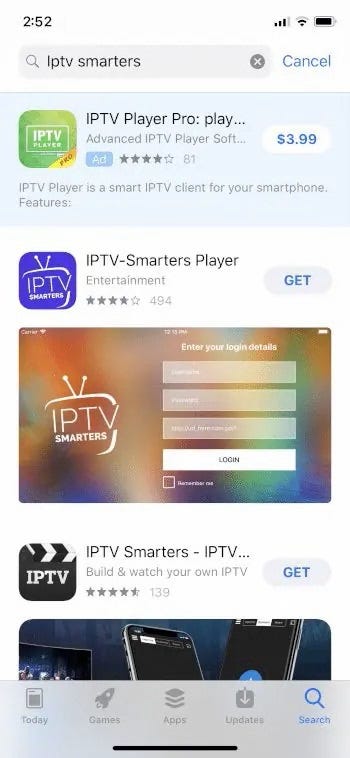
1. Selecting the Right IPTV Service
The first step on your journey to mobile IPTV bliss is choosing the right service provider. In Kenya, you have various options such as Zuku, Safaricom Home Fibre, and JTL Faiba. Factors to consider before making your decision:
1. Channel Variety:
-
- Ensure that the IPTV service offers a wide range of channels that cater to your interests. Check if they provide local and international channels, including sports, movies, news, and entertainment.
- Streaming Quality:
- The quality of the video stream is essential for a good viewing experience. Look for services that offer high-definition (HD) or even 4K streaming, especially if you have a capable device and a reliable internet connection.
- Subscription Plans:
- Evaluate the subscription plans offered by different providers. Consider your budget and choose a plan that gives you access to the channels you want without unnecessary additional costs. Some providers may offer flexible plans with options for customization.
- Reliability and Stability:
- Research the reliability and stability of the IPTV service. Frequent buffering, downtime, or poor service can be frustrating. Read user reviews to get an idea of the service’s performance and reliability.
- User Reviews:
- Check online reviews and testimonials from other users. This can provide valuable insights into the experiences of current or previous subscribers. Pay attention to both positive and negative feedback to make an informed decision.
- Customer Support:
- Consider the level of customer support provided by the IPTV service. A responsive and helpful customer support team can assist you in resolving issues promptly.
- Device Compatibility:
- Ensure that the IPTV service is compatible with the devices you plan to use, such as smart TVs, streaming devices, smartphones, or tablets. Some services may offer apps for various platforms.
- Trial Period:
- If available, take advantage of any trial periods or demo versions offered by the IPTV service. This allows you to test the service and evaluate its features before committing to a long-term subscription.
- Additional Features:
- Look for additional features such as on-demand content, DVR capabilities, and simultaneous streaming on multiple devices. These features can enhance your overall viewing experience.
2. Ensuring Mobile Compatibility: The Key to Seamless Streaming
As you embark on your journey into the world of IPTV on your mobile phone, compatibility is the linchpin for a flawless streaming experience. Here’s why and how to ensure your chosen service harmonizes seamlessly with your mobile device.
Why Compatibility Matters:
Mobile devices come in various shapes, sizes, and operating systems. Ensuring compatibility ensures that your IPTV service functions optimally on your specific device. Without this crucial step, you might face issues ranging from app crashes to subpar streaming quality.
How to Check for Compatibility:
- Visit the Official Website: Navigate to the official website of your chosen IPTV service. Most providers offer detailed information about the devices they support. Look for a section labelled “Supported Devices” or a similar term.
- Customer Support Inquiry: When in doubt, reaching out to customer support can provide immediate clarification. A quick call or message can confirm whether your mobile phone model and operating system align with the IPTV service’s specifications.
- App Store/Play Store Compatibility: Before downloading the IPTV app, check its compatibility on the App Store (for iOS users) or Google Play Store (for Android users). App listings usually indicate the devices and operating systems the app is designed for, giving you a quick confirmation.
What to Look For:
- Mobile Operating System Compatibility: Ensure that the IPTV service supports your mobile phone’s operating system (iOS, Android, etc.). An incompatible operating system can lead to app instability or even prevent installation.
- Device Model Compatibility: Some IPTV apps may be optimized for specific mobile phone models. Check if your device is listed in the supported models to guarantee a smooth streaming experience.
Why Verification is Essential:
- Optimal Performance: Confirming compatibility ensures that the IPTV app runs smoothly on your mobile phone, minimizing the risk of crashes, freezes, or other performance issues.
- User Experience: A compatible app enhances the overall user experience, providing seamless navigation and maximizing the features available on your specific device.
- Preventing Frustration: Avoid the frustration of discovering compatibility issues mid-stream. A quick verification upfront saves time and ensures you can enjoy your favourite content without interruptions.
3. Subscription and Account Setup: Your Gateway to IPTV Delight
Now that you’ve pinpointed the perfect IPTV service for your mobile escapades, it’s time to cross the threshold into a world of endless entertainment. Subscription and account setup are your key to unlocking the full potential of your chosen service. Here’s a step-by-step guide to making this transition seamless:
1. Visit the Provider’s Website:
Navigate to the official website of your selected IPTV service. This is your virtual gateway to a plethora of channels, shows, and movies. The website typically hosts all the information you need to kickstart your subscription journey.
2. Choose a Subscription Plan:
Providers usually offer a variety of subscription plans catering to different preferences and budgets. Take a moment to explore the available plans, considering factors like channel selection, streaming quality, and pricing. Opt for the plan that aligns best with your entertainment needs.
3. Create an Account:
Once you’ve selected your desired subscription plan, it’s time to create your account. This involves providing basic information such as your email address and creating a secure password. This account will serve as your portal to the IPTV service, so choose credentials you can easily remember.
4. Confirm Your Email:
Some IPTV providers may require email verification to activate your account. Check your email inbox for a verification message and follow the provided link or instructions. This step ensures the security of your account and provides a seamless transition into the world of IPTV.
5. Trial Periods: A Sneak Peek into Entertainment
Many IPTV services sweeten the deal by offering trial periods for their subscription plans. Consider taking advantage of this opportunity to explore the service’s features, test streaming quality, and confirm that it aligns with your expectations. Trial periods are a risk-free way to experience the IPTV service before committing to a long-term subscription.
6. Payment Options: Secure and Convenient
When subscribing, providers usually offer various payment options. Choose the method that suits you best, whether it’s credit/debit cards, mobile money, or other electronic payment methods. Ensure the payment process is secure and that you receive a confirmation of your subscription.
7. Explore Additional Features:
Some IPTV services may offer additional features or add-ons to enhance your viewing experience. Explore these options during the subscription process to customize your plan further. Whether it’s premium channels, on-demand content, or DVR capabilities, tailoring your subscription ensures you get the most out of your IPTV service.
8. Set Up Automatic Renewal:
To avoid interruptions in your IPTV service, consider setting up automatic renewal for your subscription. This ensures seamless access to your favourite content without the need for manual renewal each billing cycle.
4. Downloading the IPTV App: Tailoring Your Experience on Mobile Phones
For users whose IPTV providers may not offer dedicated apps, fear not. You can still elevate your mobile viewing experience using alternative IPTV players. Here’s a step-by-step guide, categorised by mobile operating systems:
For Android Users:
- TiviMate IPTV Player:
- A user-friendly player with an intuitive interface and advanced features.
- Download Link
- Perfect Player IPTV:
- Offers a clean and customizable interface with support for various IPTV services.
- Download Link
- Lazy IPTV:
- A lightweight player that supports playlist formats, making it versatile for various IPTV setups.
- Download Link
For iOS Users:
- IP Television – IPTV M3U:
- Provides an easy-to-use interface and supports multiple IPTV playlists.
- Download Link
- IPTV Player:
- Simple and effective, this app supports streaming from various IPTV services.
- Download Link
- Flex IPTV:
- A feature-rich player with support for multiple playlists and an intuitive interface.
- Download Link
For Other Operating Systems:
- Kodi:
- Available for Windows, macOS, Android, iOS, and more.
- A versatile media player that supports IPTV with the installation of relevant add-ons.
- Download Link
- IINA (macOS):
- A modern and open-source media player for macOS with IPTV support.
- Download Link
- My IPTV Player (Windows):
- A dedicated IPTV player for Windows with a straightforward interface.
- Download Link
Recent Comments